
| 일 | 월 | 화 | 수 | 목 | 금 | 토 |
|---|---|---|---|---|---|---|
| 1 | 2 | 3 | 4 | 5 | 6 | |
| 7 | 8 | 9 | 10 | 11 | 12 | 13 |
| 14 | 15 | 16 | 17 | 18 | 19 | 20 |
| 21 | 22 | 23 | 24 | 25 | 26 | 27 |
| 28 | 29 | 30 | 31 |
- 인텔리제이
- while문
- dbms
- 람다함수
- 오브젝트
- 스프링부트 버전
- 버전의 중요성
- do while문
- 코틀린
- 안드로이드 스튜디오
- 스프링부트2.7.9
- 로그캣
- 엘비스
- 컴패니언
- typeAlias
- 타입별칭
- downto
- 반복문
- 오버라이드
- 초기화 미루기
- Until
- when문법
- Kapt
- lateinit
- for문
- MySQL
- 접근제한자
- 맥북M1
- 널 안전성
- 통합개발환경
- Today
- Total
좌충우돌 코딩
안드로이드 스튜디오 - issue id: hardcodedtext 경고 해결 본문
디자인 모드로 열심히 만드는 중에 거슬리는(?) 경고가 있었는데, 해결방안을 몰랐다.....;;
요즘 개발하기 좋은 이유는 통합 개발 환경(IDE)가 너무너무 잘 되어있다. 그것도 똑똑한 개발자가 만들었겠지만~
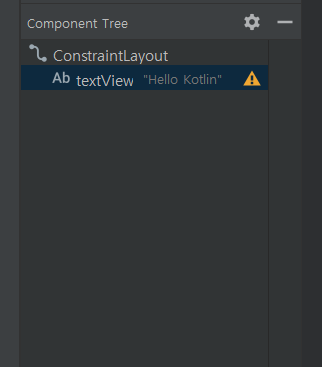
레이아웃 에디터에서 기존에 있던 핼로우 월드 텍스트뷰를 삭제후,
새로운 텍스트뷰를 디자인창에 뿌렸을 때 나오는 경고입니다.
경고가 뭔지 궁금하면 노란색 느낌표를 눌러주면 친절하게 알려줍니다.
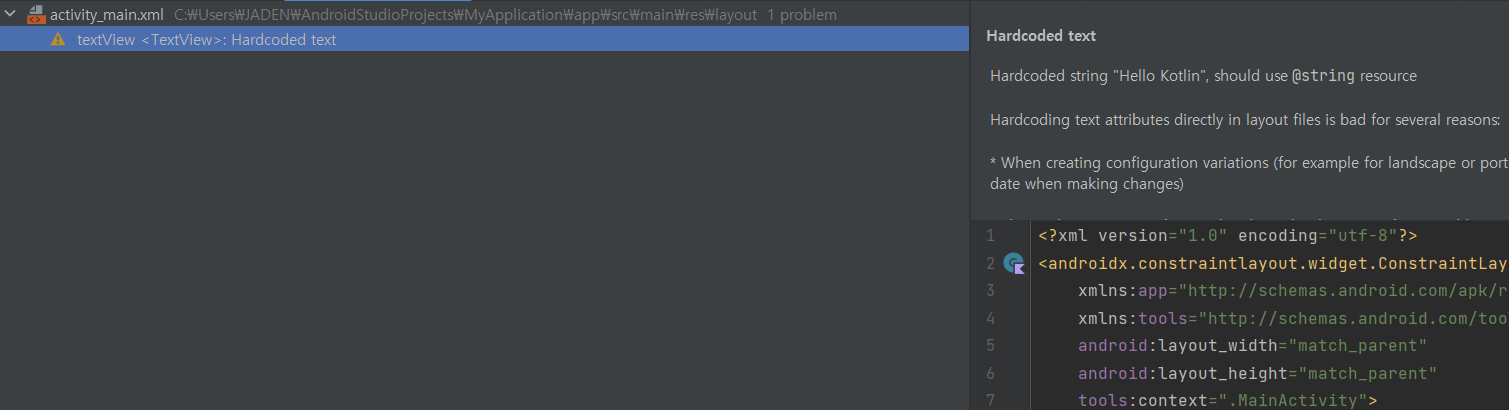
경고의 문구는 아래와 같습니다.
Hardcoded text
Hardcoded string "TextView", should use @string resource Hardcoding text attributes directly in layout files is bad for several reasons: * When creating configuration variations (for example for landscape or portrait) you have to repeat the actual text (and keep it up to date when making changes) * The application cannot be translated to other languages by just adding new translations for existing string resources. There are quickfixes to automatically extract this hardcoded string into a resource lookup. Issue id: HardcodedText
Vendor: Android Open Source
Project Contact: https://groups.google.com/g/lint-dev
Feedback: https://issuetracker.google.com/issues/new?component=192708
옛날 안드로이드 스튜디오를 사용하신 분들은 더욱 친절하게 Fix 버튼이 존재했는데,
최신 안드로이드 스튜디오는 살짝 숨겨놨네요.
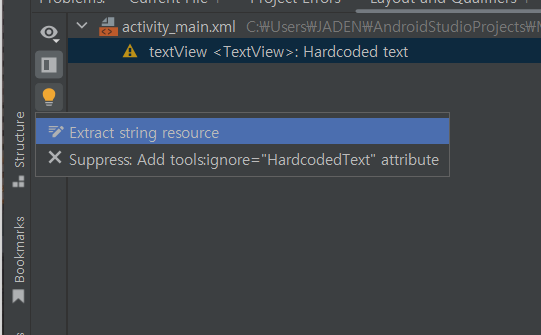
왼쪽에 전구를 눌려서 고칠 수 있습니다.
Extract string resource를 눌러서 고쳐봅시다.
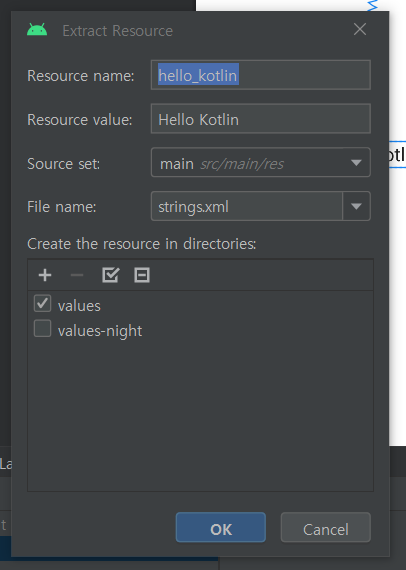
위와 같은 화면이 나오면 됩니다. 여기서 수정할 것은 없고 바로 OK를 눌러도 됩니다.
만일 리소스 이름이나 값을 변경하고 싶으면 변경 후 OK를 누르면 되겠죠?
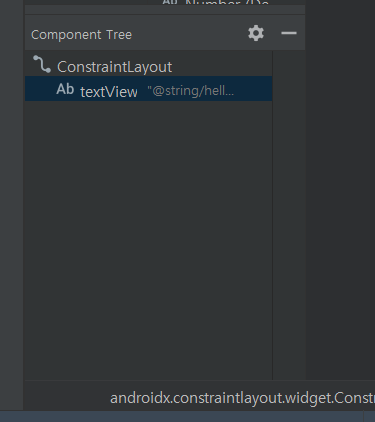
아까와 다르게 노란색 경고가 없어진 것을 확인할 수 있죠.
그럼 무엇이 바뀐 것인지 궁금하실 겁니다. 아닌가요?ㅋㅋ

프로젝트에서 res폴더에 values폴더 안에 strings.xml이란 파일을 열면 아까 추가한 리소스 이름이 들어가 있는 것을
확인할 수 있습니다.

그럼 이만~!
'코틀린 > 안드로이드' 카테고리의 다른 글
| 맥북 M1 Execution failed for task ':app:kaptDebugKotlin' 오류 해결 (0) | 2023.04.29 |
|---|---|
| 안드로이드 스튜디오 - 임포트(Import) 자동추가 및 자동삭제 (0) | 2023.04.03 |
| 안드로이드 로그와 로그캣 (1) | 2023.03.21 |
| kotlin-android-extensions 플로그인 에러 (0) | 2023.03.18 |


